Best Free Image to Excel Converters, Compared (October 2026)
Updated October 15, 2026 · image2excel.app is our own product — see disclosure below.
Short answer: For a free picture-to-Excel converter with no signup, image2excel.app, Utilvo, OCR2Excel and DocuPipe all turn a table image into an XLSX file you can edit. Pick image2excel for PNG/JPEG/WebP screenshots that contain Chinese text, OCR2Excel or DocuPipe if you also need PDF input, and none of them if your table is handwritten.
Try the free image to Excel converterFive tools compared
Input formats, export files, signup, and free limits. Each source link goes to the vendor page checked on Oct 14, 2026.
| Tool | Input formats | Export | Signup required | Free limits | Notes | Source |
|---|---|---|---|---|---|---|
| image2excel.app | PNG, JPEG, WebP (no PDF) | Editable table → XLSX, CSV (UTF-8 BOM) | No | Free, no limit on the number of conversions. No signup. 1 image per conversion. | Supports Chinese text; handwriting basically not recognized; recognition runs in your browser; the image is not uploaded | |
| Utilvo | JPG/JPEG, PNG, WebP, BMP | .xlsx, CSV | No (vendor: "100% free") | Vendor: no file size limits, daily quotas or row restrictions | Utilvo says processing runs in the browser (WebAssembly). | |
| OCR2Excel | PNG, JPG/JPEG, WEBP; PDF ≤10 pages; GIF rejected | .xlsx + CSV (UTF-8 BOM) | No | Images ≤10 MB, ≤3 files / 20 MB per run; PDF ≤25 MB | English only for now; low-confidence cells highlighted | |
| SnapTable (GitHub) | PNG, JPG, WEBP, BMP | CSV, .xlsx, JSON, clipboard TSV | — (self-hosted) | Open source | Self-host via Python/Node or Docker; OpenCV + PaddleOCR/Tesseract; has an API | |
| DocuPipe | JPG, PNG, WEBP, TIFF, HEIC | .xlsx | No | Images ≤14 MB; a daily number of free runs per network | DocuPipe says images are sent to DocuPipe's servers for processing; one sheet per table; separate PDF tool |
Each tool
image2excel.app
image2excel.app converts PNG, JPEG, and WebP table images. It shows an editable table, then exports XLSX or CSV with a UTF-8 BOM, so Chinese characters open correctly in Excel. No signup. Free, no limit on the number of conversions, one image at a time. Here, recognition runs in your browser; the image is not uploaded. It does not accept PDF, and it basically cannot read handwritten photos. In our own check on Oct 14, 2026, one printed 4×4 table with dates, times and Chinese text came back with all 16 cells correct. That is a single sample, not a benchmark. You can convert JPG to Excel. Best for screenshots and printed tables with Chinese text.
Utilvo
Utilvo is a site of spreadsheet utilities, and image to Excel is one tool on it. The tool accepts JPG, JPEG, PNG, WebP, and BMP, and it exports .xlsx or CSV. No account is required. Utilvo says the tool is "100% free", with no file size limits, daily quotas, or row restrictions. Utilvo says processing runs in the browser using WebAssembly. As of Oct 14, 2026, the vendor page does not name supported languages. Best for people who already use Utilvo's other Excel tools.
OCR2Excel
OCR2Excel turns PNG, JPG, JPEG, and WEBP images into .xlsx and CSV with a UTF-8 BOM, and it also accepts a PDF of up to 10 pages. GIF files are rejected. No signup is required. Images must be 10 MB or smaller, a run allows up to 3 files or 20 MB, and a PDF must be 25 MB or smaller. Several images can be placed on separate sheets, and low-confidence cells are highlighted. The site says English is available now, so language support is English only for now. Best for English tables and PDF pages.
SnapTable (GitHub)
SnapTable on GitHub is open-source software you run yourself with Python, Node, or Docker. It accepts PNG, JPG, WEBP, and BMP, and it can export CSV, .xlsx, JSON, and clipboard TSV. The project uses OpenCV with PaddleOCR or Tesseract, and it includes a POST /extract-table API. There is no hosted free quota in this row: the free limit is the open-source code. Best for developers who can deploy their own service. Not for someone who wants to open a web page and convert a file right away. Not to be confused with snaptable.app, a separate paid desktop screen-capture product.
DocuPipe
DocuPipe's image tool accepts a pasted screenshot or an uploaded JPG, PNG, WEBP, TIFF, or HEIC file, and it exports .xlsx. Images must be 14 MB or smaller. No signup is required. The same network receives a daily number of free runs; the vendor does not publish that number, and the page does not list CSV export. When one picture holds several tables, each table goes on its own sheet. DocuPipe says images are sent to DocuPipe's servers for processing. A separate DocuPipe tool handles PDFs. Best for phone photos, iPhone HEIC files, and pictures that contain more than one table.
Pick image2excel if
- Your image is a PNG, JPEG or WebP screenshot or photo of a printed table.
- The table contains Chinese text and you need a CSV that opens without garbled characters in Excel.
- You want to fix cells in an editable table before downloading, without creating an account.
Pick something else if
- Your source is a PDF → OCR2Excel (≤10 pages) or DocuPipe PDF to Excel.
- Your photo is HEIC/TIFF → DocuPipe.
- You need an API or a self-hosted tool → SnapTable (GitHub) or DocuPipe.
- Your table is handwritten → none of these is a reliable choice; image2excel basically cannot read it.
Limitations of image2excel
- No PDF or HEIC input — export the page as PNG or JPEG first, then extract a table from an image.
- Handwritten photos are mostly not recognized. image2excel basically cannot read them. Use typed or printed tables.
- Very large images and tables over ~160 cells may have lower recognition quality.
- Results depend on image quality; always review the editable table before exporting.
- Our Chinese-text check so far covers one printed 4×4 table (Oct 14, 2026). We'll publish a larger test set before making broader claims.
Choosing a free converter
What to look for before you upload
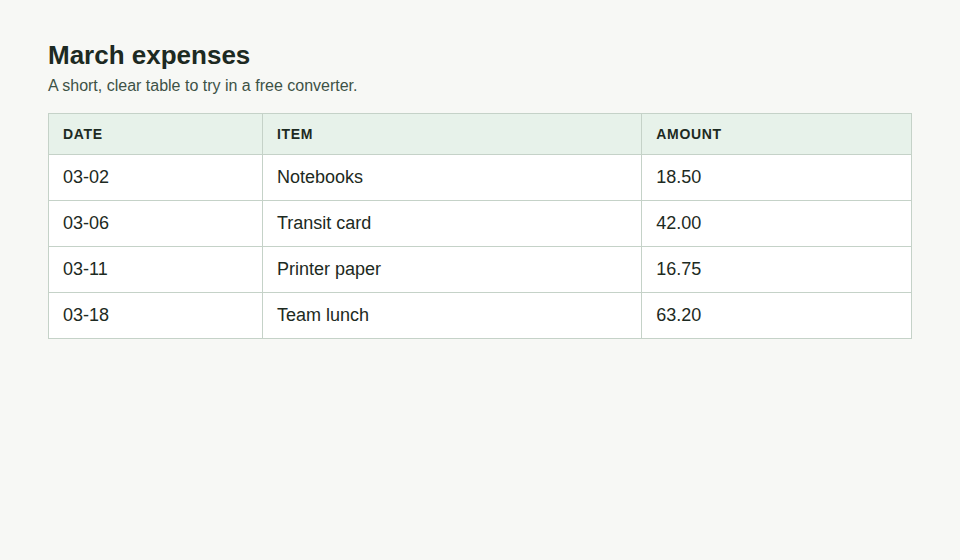
Start with the file you actually have. A free converter is useful when it accepts that file, lets you edit the grid before download, and does not ask for an account. On image2excel, PNG, JPEG, and WebP are accepted, and converting is free with no signup: Free, no limit on the number of conversions. The image stays in your browser during conversion and is not uploaded to a server. PDF and HEIC are not accepted here; the table above names tools that publish those formats. The sample is a short expense table, a clear grid to try before a dense report.
Frequently asked questions
What is the best free image to Excel converter?
It depends on your file: for PNG/JPEG/WebP tables with Chinese text, image2excel.app; for PDFs, OCR2Excel or DocuPipe; for developers, SnapTable on GitHub. All of them export XLSX for free.
Is there a free picture to Excel converter with no signup?
Yes. image2excel.app, Utilvo, OCR2Excel and DocuPipe's image tool can all be used without an account (per each vendor's page, checked Oct 14, 2026).
Can I convert a PDF with image2excel?
No. image2excel accepts PNG, JPEG and WebP only; save the PDF page as an image first, or use a tool that accepts PDFs.
Will Chinese characters show correctly in the CSV?
Yes. image2excel's CSV is saved with a UTF-8 BOM, so Excel opens Chinese text without garbling.
Can these tools read handwritten tables?
Not reliably. image2excel basically does not recognize handwritten photos, OCR2Excel says handwriting "can partially work", and DocuPipe says clear block handwriting "usually reads well" while cursive is best effort.
What should I check on a free image to Excel converter?
Check the image types it accepts, whether you can edit cells before download, and whether it asks for an account. On image2excel, converting is free with no signup: Free, no limit on the number of conversions. The image stays in your browser during conversion and is not uploaded to a server.
Do the free tools on this page accept PDF and HEIC?
Not all of them. image2excel accepts PNG, JPEG, and WebP only. PDF and HEIC are listed on the tools that publish those formats.
Does this page rank converters with a score?
No. There is no score and no star rating. Match your file to the inputs and limits quoted from each vendor page.
Disclosure
image2excel.app is our product. Competitor facts come from each vendor's own pages, linked in the table and checked on Oct 14, 2026. Spot an error? Tell us and we'll fix it.